PDF Metadata
PDF Generator supports comprehensive PDF metadata, including standard Info dictionary fields and XMP (Extensible Metadata Platform) data. Metadata is embedded directly in generated PDFs.
Metadata Fields
Info Dictionary
Standard PDF metadata fields:
| Field | Description |
|---|---|
| Title | Document title |
| Author | Document author/creator |
| Subject | Document subject or description |
| Keywords | Comma-separated keywords |
| Creator | Application that created the document |
| Producer | Application that produced the PDF |
| Creation Date | When the document was created |
| Modification Date | When the document was last modified |
XMP Metadata
Extended metadata stored in XMP format — used by search engines, digital asset management systems, and PDF/A compliance:
| Field | Description |
|---|---|
| XMP Title | Title in XMP namespace |
| XMP Creators | List of creators |
| XMP Description | Description text |
| XMP Creator Tool | Tool used for creation |
| XMP Producer | Producer identifier |
| XMP Keywords | Keywords array |
| XMP Create Date | Creation timestamp |
| XMP Modify Date | Modification timestamp |
| PDF Version | PDF specification version |
Metadata Modes
Simple Mode
In simple mode, Info fields are automatically copied to their XMP counterparts when the PDF is generated:
info.title→xmp.titleinfo.author→xmp.creatorsinfo.subject→xmp.descriptioninfo.creator→xmp.creatorTool
This is the default mode for Free tier accounts. It ensures consistent metadata across both Info and XMP without manual duplication.
Advanced Mode
Advanced mode gives you full manual control over all metadata fields — Info and XMP are independent. This is available on paid tiers (Bronze and above).
Jinja Templating in Metadata
Metadata values support Jinja-style templating, allowing dynamic values from your template's variables:
Title: "Invoice for {{ customerName }} — {{ invoiceDate }}"
Author: "{{ user.fullName }}"
Keywords: "invoice, {{ organization.name }}, {{ invoiceNumber }}"
When a document is generated, these templates are rendered with the actual variable values.
Configuring Metadata Defaults
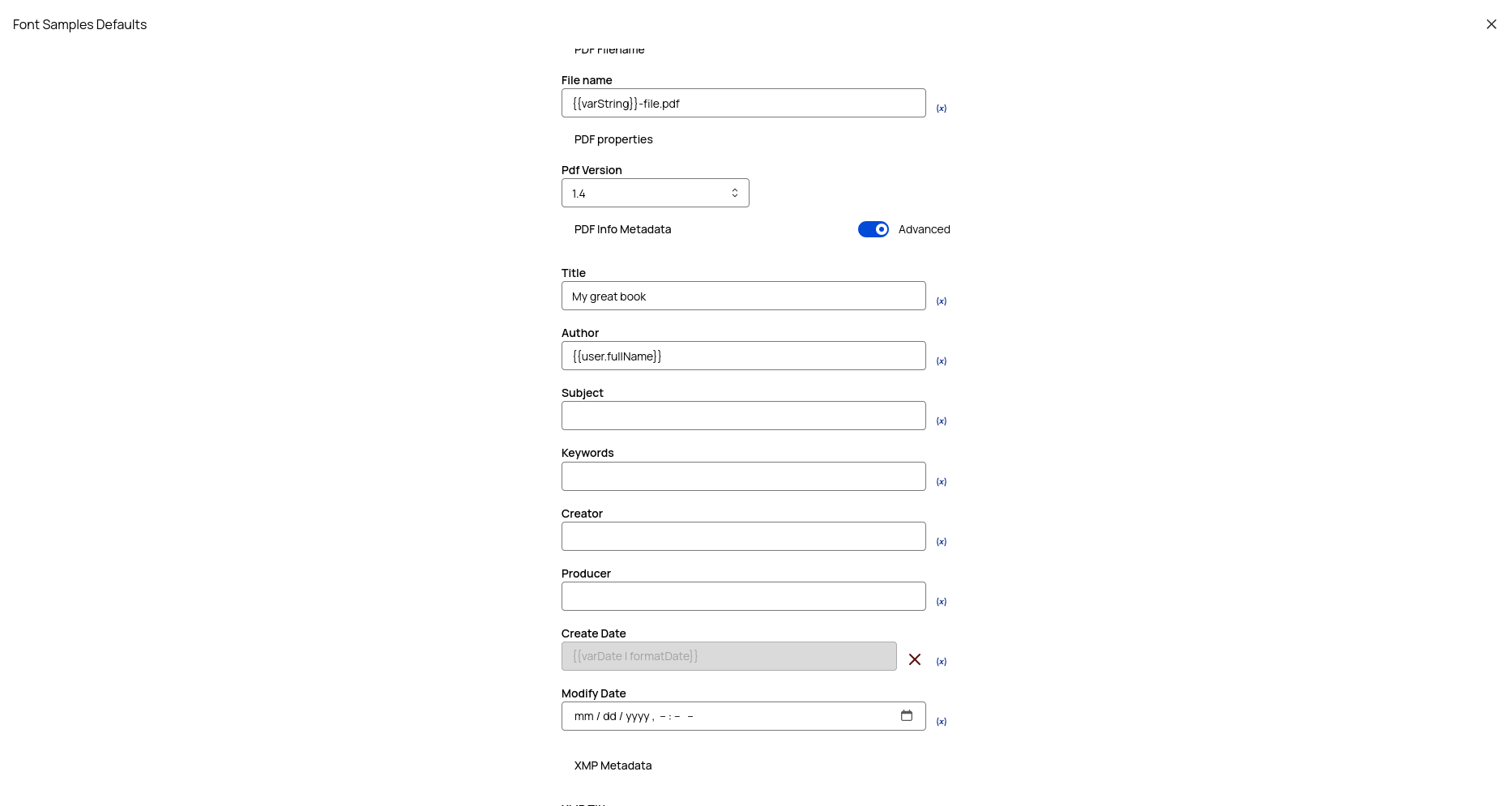
Metadata defaults are set at the template level — they act as fallback values when generating documents:
- Open your template in the editor
- Expand the Defaults section (may also appear on the generation page)
- Fill in the metadata fields you want as defaults
- Use
{{ variableName }}syntax for dynamic values
Timezone Configuration
Set a timezone for date fields in metadata. This ensures creation and modification dates reflect the correct local time regardless of where the PDF is generated.
Renderer Support
| Renderer | Metadata Support |
|---|---|
| iText | Full metadata support — both Info and XMP embedded natively |
| Puppeteer | Limited — metadata is applied via a separate post-processing step after rendering |
For production PDFs requiring full metadata support, use the iText renderer.